


 View Cart
 Search Our Site
 Products
 Knowledgebase
 Company Info
 Contact Us
 Help
HelpCordless Phone / Wi-Fi / RFID Troubleshooting
The frequencies used by cordless phones, RFID, baby monitors, wireless security cameras, Bluetooth and Wi-Fi are in the unlicensed 2.4 ghz (and 5.0 ghz) band carved out by the FCC. Because it's all unlicensed, just about anything can share these frequencies with impunity. There are no FCC police to prevent problems.
Cordless phones are often painful to install and troubleshoot. Making them work right is time consuming, expensive, and frustrating. Sometimes we just can't make them work right.
Diagnosing why the cordless phone doesn't work isn't straightforward, mainly because we don't have diagnostic tools (like we do for wired phones). The cellular companies have plenty of dead spots and they have the tools to diagnose the problem (a van full of radio receivers and transmitters, and spectrum analyzers). There are still plenty of cellular dead spots, mainly because they can't find a place to put up another tower, or they don't feel it's worth the expense.
In an office, factory, or home, we have all of the same problems that the cellular companies have without the resources of a cellular company. These problems also affect Wi-Fi and RFID applications. The problems are exactly the same, and sometimes other stuff is the problem (interference).
This is what effects the RF signal:
• Frequency (lower frequencies like 900mhz penetrate walls better, 1.9ghz DECT has the least interference from other type of wireless devices, and 5.8ghz doesn't penetrate walls well)
• Distance from base (antenna) to handheld
• Number of partitions (walls, floors, and ceilings)
• Material of partitions (drywall, concrete, rebar, aluminum, steel)
• Stuff in the way (trees outside, big metal equipment inside)
• Interference - Other devices using the same frequencies (unlicensed devices all share the same channels in the same frequency bands)
There is no question that using 900mhz phones will give you the best penetration of walls and possibly the best distance. I don't know why, but 900mhz isn't sexy, and it's not used much these days. Most manufacturers make the new 1.9ghz (DECT), 2.4ghz or 5.8ghz phones.
The newest frequency band used for cordless phones in the US is 1900mhz (1.9ghz), usually called DECT because of the digital standard used in the communications. DECT has been used in Europe and Asia for some time. The FCC decided to clear out the frequencies that were used for European DECT and allow those phones to be used here.
DECT is probably the best choice for basic home or office cordless phones since there's no interference from baby monitors or Wi-Fi on that band right now. 1900mhz doesn't penetrate walls as well as 900mhz phones, but it's a lot better than the 2400mhz (2.4ghz) band because there's no interference (and penetration is a little better).
900mhz phones share unlicensed channels with other RF devices like baby monitors, wireless cameras, RFID, and other phones. Since 900mhz isn't sexy, there's not much stuff using that band anymore. While most of these unlicensed devices are designed to detect which channels are in use and pick a different one, some do a better job than others. Older cordless phones might not even try and jump on a channel and go. Some of them might have a channel button, so you can manually change the channel during a conversation. Not good in a business environment.
2.4ghz is the most crowded band... with 2.4ghz phones, Bluetooth and Wi-Fi being very popular. There's even 2.4ghz wireless broadband using directional antennas from a tall tower directed at homes and offices, and in some areas there's free neighborhood Wi-Fi where the 2.4ghz Wi-Fi signal is all over the place.
What's worse, some newer Wi-Fi devices "bond" together more than one channel so they'll go faster (channel sharing). That's a nice idea but since there are a limited number of channels, that can really cause interference with other 2.4ghz non-Wi-Fi devices, or even a Wi-Fi device at the business next-door. Cordless phones can kill the Wi-Fi network, the Wi-Fi network can kill the cordless phones, and it's pretty hard to know what's really going on.
If you use a 2.4ghz cordless phone with a Bluetooth headset (which is also 2.4ghz), and you have a Wi-Fi B router (2.4ghz) for the Internet, and maybe 2.4ghz baby monitor or wireless camera, none of these things are going to work well! It's even worse when a neighbor has this stuff in their home or office, and it's screwing up your wireless devices.
If you use a Wi-Fi 802.11N router, which works on 2.4ghz and 5ghz, and Wi-Fi N cards for your computers, you can usually tell the router to just use the 5ghz band which will avoid interference with 2.4ghz phones and RFID equipment. Older W-Fi B wireless cards in laptops won't work in that situation (the 2.4ghz band was included in N routers to make them compatible with the older, slower B cards). If there are no guests on the wireless network that have to use B, this is a good way to go.
If you need to troubleshoot and fix the problem, MetaGeek makes a relatively inexpensive Spectrum Analyzer (tiny USB dongle at $199 at this writing) with software (inSSIDer Office) for diagnosing 2.4ghz and 5ghz usage by Wi-Fi and other devices that can clobber the Wi-Fi or other device signals. It also lets you see how many networks are sharing the same Wi-Fi channel(s), which can explain why you're having problems with wireless at a particular premise.
You can't see, smell or hear this stuff, so if you really want to fix it you need a Spectrum Analyzer - and this one is as cheap and easy to use as it gets (dual or multi-band Spectrum Analyzers are normally pretty expensive!):
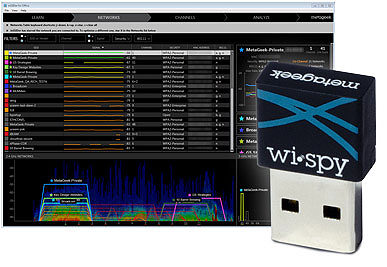
Since most of us can't afford to buy a Spectrum Analyzer for occasional use there are companies who will rent them. But a lot of the time this little $199 device will do the job.
This is a screen shot of part of the inSSIDer Office screen showing the Wi-Fi channels that are affected by non-Wi-Fi equipment, and any Wi-Fi networks that using the channels. Most modern Wi-Fi access points use multiple channels, as you can see by the brackets showing the various networks:
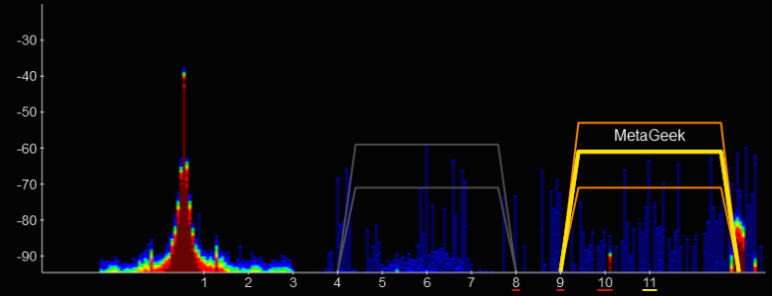
The blue lines on the graph indicate occasional transmissions and their signal strength. The red lines indicate constant transmissions. In the above illustration, it's probably an audio device like a cordless phone, wireless speaker, or audio baby monitor. It would clobber any Wi-Fi device using Channel 1!
The screen shot below shows a 2.4 ghz device, like a wireless security camera or wireless baby monitor, with a camera that needs a lot of bandwidth. Again, the red indicates that it's transmitting constantly:
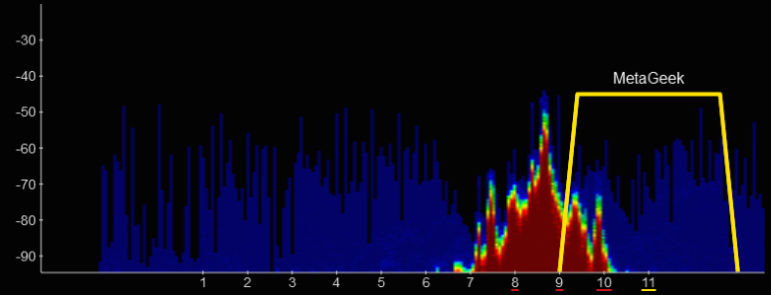
Many wireless devices (like cameras and wireless speakers) have a switch to let you choose maybe one of three "channels" to prevent interference. When you switch to a different channel, the above interference would move to some other Wi-Fi channel. As you can see it's really clobbering Channel 11 here!
All Wi-Fi access points and routers will let you change the 2.4 or 5.0 ghz channels that it uses. Sometimes they make a good guess themselves, but if things are going downhill you may need to set the channel yourself.
Note that there are only three Wi-Fi 2.4 ghz channels that don't overlap with another channel, even though there are 11 channels. Channel 1, 6 and 11 are the only ones that don't overlap. Sometimes you've just gotta do what you've gotta do at a particular premise, so you could choose 3, 8 or whatever if it gives you better performance.
The $199 USB Wi-Spy is a Spectrum Analyzer just looking at RF (radio receiver), not specifically Wi-Fi. You still need the Wi-Fi adapter in your laptop to overlay the Wi-Fi channels.
If you use a DECT (1.9ghz) phone with a Bluetooth headset (2.4ghz), and an N router (5ghz) and a 900mhz baby monitor, you probably won't have any interference between the devices. If you're purchasing cordless devices it can be well worth your time to think it through before you buy the stuff, rather than spending time troubleshooting and returning stuff afterwards.
If an office backs up or is next door to another business, you could have interference from their wireless stuff that you have no way of knowing about, unless you go next door to ask them about wireless stuff they use. Having a next-door neighbor with welding machines that put out garbage over the entire frequency spectrum could make you chase your tail for months. The phone lines for your business could even be running right past those welding machines on the way to your office.
Engenius, the longest-range US cordless phones made, use the 900mhz band. Both the base station and handhelds have antenna connectors to allow maximum coverage. Somehow, this manufacturer's phones seem to have more transmit power than consumer cordless phones. Some users plug the handsets into antennas in cars or trucks to be able to answer phones while they drive around a large property.
Most consumer phones don't have antenna connectors, especially on the handsets. In most cases, a taller antenna works better on the handset than a smaller antenna. If the base station has an antenna connector, technically speaking you can use an antenna splitter to mount two antennas - like on each side of a concrete wall to cover two areas with one base station. Practically speaking, you'd need to get a splitter for the correct frequency band, use as little of the correct low-loss coax cable as possible, have the right connectors on the cable (or adapters), and you still end up with less than half the power to each antenna (due to losses in the splitter and cable). Will it make a difference? Maybe, but it's expensive to find out.
If you mount an antenna outside, you definitely need a lightning protector between the antenna and base station. It would have to be grounded well to help save the base station in a lightning storm.
Very high-power cordless phones are available in other countries, and some people illegally sell them here in the US (usually marked "For Export"). Since most of them transmit on US amateur radio frequencies, you can count on the FCC being notified of their illegal use almost immediately (by an amateur), and a pretty big fine if they aren't shut off after the FCC comes calling. If it transmits on some national defense frequency or you interfere with aircraft communications, it could be more than a fine.
Most cordless phones connect to a standard analog phone line, or analog extension port. Some phone system manufacturers have their own cordless phones made to plug into a digital extension port, giving you some additional features that work with that particular phone system. Those types of phones are fairly tightly integrated to that particular phone system, which is good. Some also offer a cell-based approach, where you can put multiple cell type base stations in the business for better coverage.
No matter what you do, there will be a high cost of maintenance on these types of cordless phones. No other cordless model/brand will work with that system, so you have to repair or replace the cordless handsets with the same make/model. No matter what, a cordless phone will never last as long as a desk phone - which is seldom (if ever) dropped on a floor, sat on or stepped on. Even the most careful employee will destroy many cordless phones over the life of a desk phone, but the improved productivity should make up for that additional maintenance expense.
One of the biggest problems with selling your customers accessories for their phone system is that the accessories can easily cost more than the KSU. Phone systems have generally gotten so cheap that adding $1,000 worth of accessories to make it work for the customer's application, whether it's a cordless phone from the phone system's manufacturer or Loop Current Regulators for each phone line, the customer can easily think you're nuts or ripping them off for the accessories.
In the case of a cordless phone - in many cases the productivity increase will easily pay for the accessory, but that's a hard thing for some customers to keep in mind when they're writing the check. Today, with one person doing multiple jobs in many cases (due to layoffs/the economy), increasing productivity may be the only way for the company to survive, and a cordless phone may be a very important accessory.
Whatever kind of phone you buy, figure it will be discontinued pretty quickly. If it's a business type phone, they'll have a longer life, and they might be around on the refurbished market for a while. If it's a consumer cordless phone or system (like AT&T, V-Tech, Uniden, Panasonic, etc.), it will probably be discontinued pretty quickly. If you need repair, replacement, or an additional handset for one of those consumer type cordless phones - you're probably out of luck. They seem to change consumer / retail models every few minutes. Your choice at that point is eBay, or going with the latest greatest system (that's probably not compatible with the previous model).
"Cell type" cordless phones can be the only way to get cordless phones to work in a particular facility. This lets you put several base stations around the building / grounds, giving you a better chance at covering the whole place.
Multiple base stations aren't always a fix for bad reception. You have to place the base stations so that they have a clear shot, with as few partitions as possible, between the base and cordless handset.
You also have to figure out what the floors and partitions are made of and plan the placement of the base stations so the radio signals will be able to reach the handset.
A solid metal wall or floor is enough to stop RF cold. A concrete wall or floor with rebar, metal rods running through the concrete to give it more strength, will stop most of the RF.
Wooden studs and drywall stop some of the RF. Metal studs and drywall stop more.
Big metal machines or metal warehouse shelves between the base and handset will have a big effect on coverage. Placement of the base station (if it has a built-in antenna), or the antenna connected to the base station is critical in most environments. Most antennas radiate a pattern that will let the antenna be installed upside down from the ceiling. Some antennas are made for ceiling mount. If you have multiple base stations, placement of the antennas so they don't interfere with each other is important. You may need directional antennas in some cases, which give you much greater coverage in a fairly narrow path (handsets or base stations to the side or rear won't see this antenna). They are particularly useful in hallways.
It's probably sounding like a lot of work to install cordless phones in an office or shop? It is. The labor to find the right base station locations can be substantially more than running the cable for a wired phone. It's all knowledge gained from previous installations, and trial and error. No two premises will be the same. There are different walls, floors, distances, and stuff in the building. Making cordless devices work right is nowhere near as easy as installing cabled phones or computers.
If you have to install cordless equipment before all of the furnishings, fixtures, walls or equipment is in-place, there's a pretty good chance you'll have to make some changes after the customer moves in (which will be harder because all the stuff is in the way). There's no way to anticipate the costs of making the cordless stuff work. Some of the installations will be easy. Some will be hard.
The hardest wireless problem to troubleshoot is interference from other RF devices. You can see the walls and equipment, but you can't see, smell, hear or feel RF. There's a pretty good chance that the premise has some other wireless stuff, and some of it can be on the same frequency band as the equipment you just installed. Maybe your stuff is installed first, or maybe the other stuff was installed first. It doesn't matter, because now both sets of wireless equipment might not work.
Asking the customer what other wireless devices they use would help, but in many cases the customer won't remember the wireless cameras, RFID or Wi-Fi stuff that's in-use. The customer can't see, smell, hear or feel the RF, either.
The only real solution to tracking down RF interference on the same frequencies is a Spectrum Analyzer.
In many cases, the customer just doesn't want to pay for the time it takes to install cordless phones so they work right. They go out and buy phones at the Office Biggie store, hopefully with a money back guarantee (which is good since it's not a sure thing that they'll work). In a small office, that would probably work OK and it's probably the only way to make cordless phones affordable if you don't take productivity gains into consideration - which is why they want cordless phones in the first place.
There's no way a phone system vendor can compete with the Office Biggie stores selling consumer cordless phones. The only way to install cordless stuff is T&M. You have to run the station cable for the base, which might take several tries. Making yourself a two-hundred-foot mod cord for testing from the nearest spare pair isn't a bad idea. There's a small possibility it just won't work in that particular premise no matter what you do.
If your customer can buy all-risk insurance coverage on the cordless phones (like they offer for cellular phones), that's a good idea.
Remember... Just by virtue that it's carried around, dropped, and lost, no cordless phone will hold up as well as a desktop phone in the long run, and some of them are very expensive to repair or replace. Worse than that the manufacturers often discontinue a model making repair or replacement impossible. Maybe business insurance would pay for replacing it with the current model?